


At 8:12pm on a Tuesday night at the end of March, my AI research tool finished its daily run, and I asked it for one more thing. But then the AI chat told me it couldn’t. That months of effort failed to be available or useful. That all the daily research briefs before that week were inaccessible to it. For more than a brief moment, I was crushed.
The product had been researching for me since December, a brief every day on what had changed in tech and AI, and its instructions told it to skip anything already previously covered in earlier runs. This set of briefs is a goldmine of news, metrics and data, things I could analyze to spot trends and patterns among the information to separate the wheat from the chaff. I asked it to take everything from March and give me the month’s key findings in 750 words.
But it claimed it had no access to the earlier March research, because according to it, “Each conversation with me starts fresh.” The tool offered to sum up the one week it could see and asked me to paste in the other three. I’d spent so much time building up that research, but the tool that wrote it couldn’t even read it.
Most AI tools work this way. What they know about your work lasts as long as the chat does, and the next chat starts from zero, so you’re the one carrying the context from tool to tool. Even if you’re sharp about it and have a folder full of markdown files that you’ve given the AI to start with, it can only hold so much context at once.
So I moved my research out of the tools. Those daily briefs now live in one memory store with the rest of my research and notes, and every AI agent I run searches it before it looks anything up outside. This week I asked that memory the same question I’d asked in March. It came back with the month’s findings, citing 13 of March’s daily briefs by name, from a model running on my own Mac.
The Thesis In Brief
It’s pretty straightforward, and you can guess it based on the story above: an AI tool is only as useful as what it knows about your business, and most of us hand it that context fresh in every chat and every tool - but we have the power to change that. My AI agents start from what I already know instead, because they share one tool that accesses a memory store built on top of my own research and notes.
Overnight on Wednesday, that memory read the notes from a live session I’d been on the day before and pulled one idea into a page of its own: open technical writing with a situation the reader recognizes, and save the mechanics for later. It kept the line the idea came from and checked it against the notes. Every agent of mine can find that page now, and I didn’t have to tell any of them.
What is the memory my AI agents share?
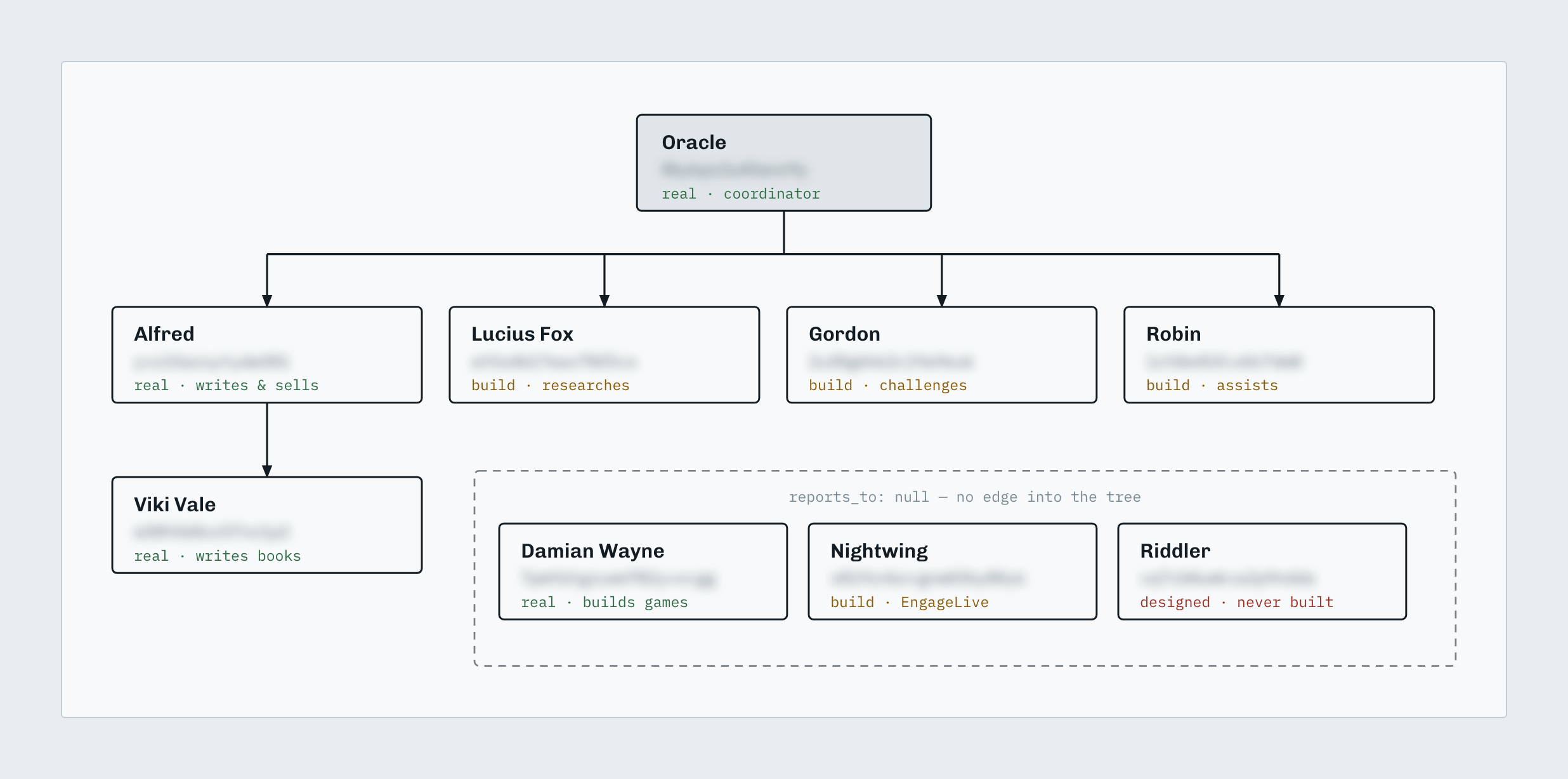
I run a small team of AI agents, which I wrote about in the last edition, and each one has a name and a job. Lucius researches. Alfred drafts in my voice. Gordon reviews every draft and hunts for what’s wrong with it. Oracle runs operations: she tracks tasks and deadlines and handles admin work. They work while I’m doing other things, and nothing goes out until I’ve approved it.
They share one memory, a knowledge base called GBrain. It’s an open source project from Y Combinator’s Garry Tan, and my copy runs on my own server. Its main section holds 639 pages of research, notes and business articles, and most of them fall into four groups:
198 research pages, going back to December of 2025: daily briefs on what changed in tech, and the business questions I’ve worked through.
168 pages filed as meetings, mostly notes from calls, coaching sessions and workshops I’ve been on.
103 pages on concepts I use.
9 single-idea pages the overnight pass has pulled out of the rest, like the one above.
I don’t keep it current by hand. Core, the custom app I run my business on, sends its knowledge articles to GBrain, 470 of them so far, and publishing an article there writes it to GBrain right away. In Oracle’s test, it took nine seconds.
Here’s how it works, in plain words. GBrain stores pages, whether they’re notes, articles or code, and it splits each one into short chunks. Then it turns every chunk into a list of numbers that captures what it means, and it’ll link related pages to each other, so an agent that describes what it wants in its own words gets the right page back, even when that page doesn’t use those words. My agents reach it over MCP, the standard plug that Claude Code, Codex and most other AI tools already speak, so there’s nothing custom to run on their side.
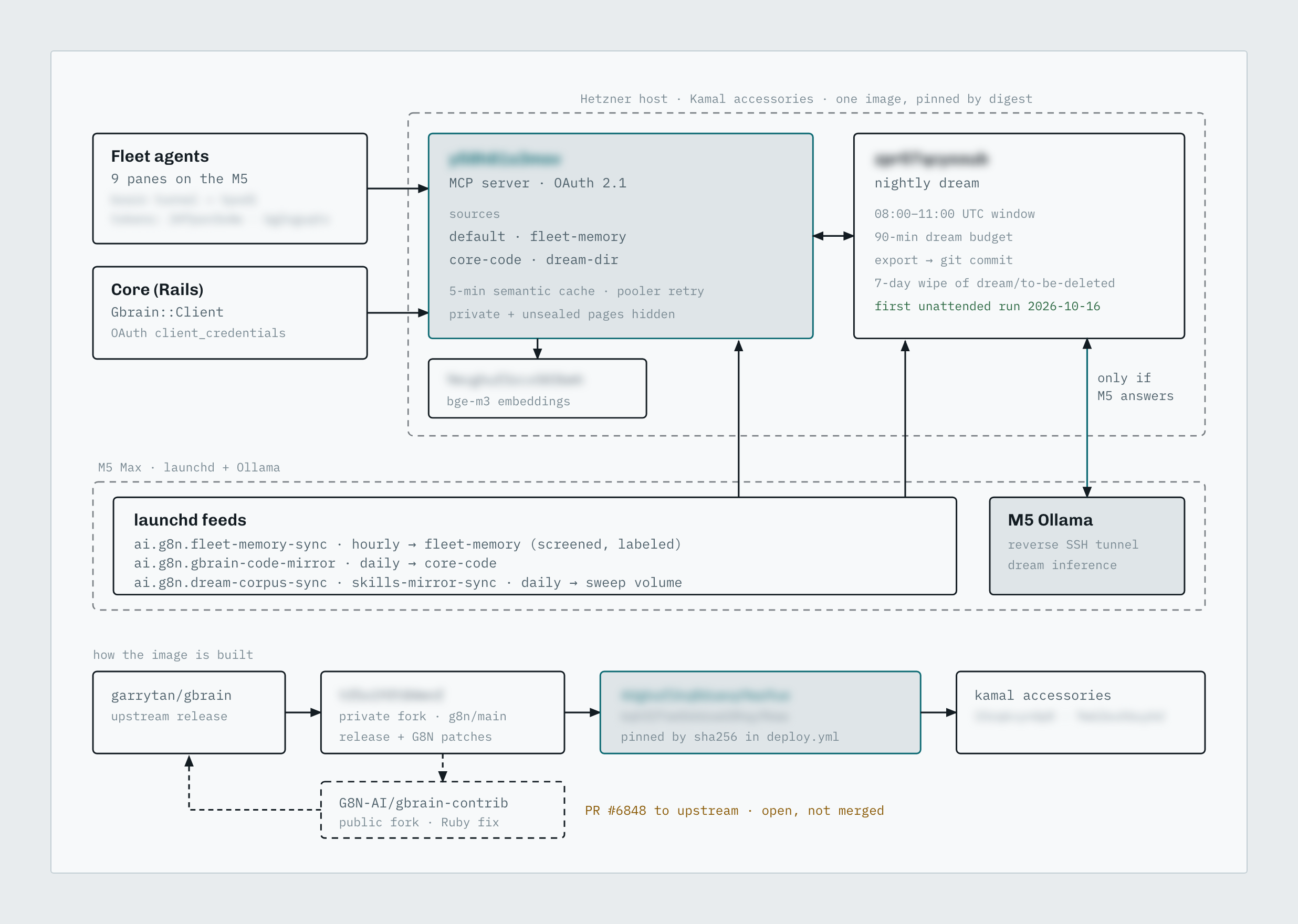
GBrain fits together: the memory server, its worker and its embedder run on one rented server, and my agents and my business app reach it from outside. Private names and addresses are blurred.That main section’s one of four in my copy. The second’s my business app’s code, copied in every day, with a map of where each piece is defined and what calls it. The third holds my agents’ own memory notes, synced every hour, and the fourth’s what the nightly pass writes. Across all four, GBrain holds 1,628 pages, cut into 10,574 chunks.
Which parts do my agents use most?
Search is the one Lucius’s audit this week marked as heavily used. Every agent I run has one standing instruction: search GBrain before looking anything up outside, and in the 30 days before the audit, that came to 248 searches.
The other one in steady use is synthesis, where a model pulls one answer together from several pages at once. In the same 30 days, a model running on my own Mac did that 107 times, for zero dollars. Of the 25 things the audit checked, 13 were unused, off or never set up, and this week I’ve turned on the ones worth having.
The instruction is there so an agent doesn’t pay again, in time or money, for research I’ve already got. When two agents ask about the same thing, they search the same pages, and a question I’ve already worked through doesn’t get worked through again.
The routine work doesn’t cost me anything per use. The numbers for each chunk come from a model on my own server, and the nightly pass runs on a model on my Mac. The server and the database still cost money every month, so I won’t call it free, but I don’t pay per question.
If you don’t write code, it’s the difference between a new contractor every morning and a teammate who’s kept track of what you decided last week and can find it even when you’ve described it badly.
Does GBrain find the right page more often than my old search?
Before GBrain, my agents searched the knowledge base inside the app I run my business on. So this week we took 32 real questions from our own work, asked both searches every one of them, and kept the top five results from each. The old search put the right page first for 12 of the 32, and GBrain did it for 23. Counting the top three results, the old search found 19 and GBrain found 31, and in the top five it was 20 against 31.

We wrote those questions ourselves, and an answer counted as right whenever the right page showed up in the results, so it’s our own lenient test and I’d never call it a benchmark. I’m leaving speed out of it too. The old search ran warm inside the app, and GBrain started up fresh for every question, so the times can’t be compared.
Why do I run my own build of GBrain?
Out of the box, GBrain ships with several of its features switched off, so I keep my own copy of it: the open-source release plus a few changes of ours, built and pinned so my server runs that exact version. When a new release comes out, our changes go back on top, and any change the release has made unnecessary gets dropped.
Those changes turned on two things my agents use. They can now ask the memory where a piece of my app’s code is defined and what calls it, over the same connection they already use to search my notes, and pages they aren’t allowed to see stay hidden. Repeated searches now come back from a cache, and anything I’ve just added still shows up within five minutes.
The code tools had one gap for my app in particular. It’s written in Ruby, and GBrain already reads and indexes Ruby code, but its map of what calls what came up empty for Ruby while it worked for other languages, so asking what calls a piece of my code returned nothing. We fixed that in our copy, and across the app’s 687 Ruby files it went from 0 links to 2,085. On my live server, asking what calls the part of my app that talks to the memory now returns its 6 callers, and the app’s command-line tasks are in the index too. Those numbers come from my app alone. Nobody had asked for the fix, but it should help anyone running GBrain on Ruby code, so I’ve offered it back to the GBrain project as a pull request, written to the project’s contribution guidelines with a test that fails without the fix. It holds only the Ruby fix and changes nothing for other languages, and the rest of our changes stay in our own build. It’s open now, and the project’s maintainers don’t merge outside pull requests as they are; they fold them into their own rounds of fixes and credit whoever sent them.
I’ve also switched on nine more of the built-in features for GBrain this week. They all run on models on my own Mac, so I don’t pay anything per use for any of them. On the same 32 questions afterward, GBrain still found the right page in its top three for 31.
What else did I switch on this week?
The nightly dream cycle, the overnight maintenance pass for
GBrain. It’s where the single-idea pages come from, and its second run finished in 51 minutes. Five of its phases need a copy of the pages on disk, and mine lives in the database, so my server now writes one out every night for those phases to work from. In the early hours of October 16, the cycle ran on its own for the first time.My agents’ own memory notes, the files each one keeps between conversations about my corrections and decisions. There were 453 of them at switch-on, and they’re now a read-only section of the memory that every agent can search, so a lesson one agent learned is there for the rest. Each note is now labeled as written by an agent, with its type and date, so an old status note can’t outrank knowledge I’ve checked.
A daily scan for text in the memory that tries to give my agents orders. They read everything in there, so something’s got to be watching it, and the first pass flagged 20 pages, and 2 short facts it had pulled out of pages, for my review.
A monthly contradiction check. On the 15th, Lucius runs it and reports what conflicts to Gordon and Oracle, and I decide each one. Its first run found one real conflict, two articles listing AI models that had gone out of date, and both were fixed the same night once I’d approved it.
An index of my business app’s code, 970 files, refreshed nightly. My agents can now ask it where a piece of code is defined and what calls it from wherever they’re running, through the build of
GBrainI described above.A search reranker, a second model on my Mac that reorders a search’s top results so the best page lands first. I’m measuring it against my own graded searches. So far it’s measured slightly worse and slower, but I’ve kept it on until a bigger test on October 21st decides whether it stays.
I count each of these as on when its status shows it ran, and the setting alone doesn’t count. That’s Lucius’s rule, “configured is not running,” and it’s how he spotted the reranker sitting configured while the readiness report from GBrain itself said it wasn’t ready.
Once it holds your business, how do you keep it safe?
A memory with your research and notes in it is worth protecting, and the easy way to connect several agents is to hand them all the same key. A key carries every right it was created with, so if it can delete, every agent holding it can delete, whether the job needs that or not. One confused instruction to any of them could delete pages the whole team depends on.
So the limits live on the server, where an agent can’t talk its way past them. A key’s scope is the list of things it’s allowed to do. Each agent gets a key scoped to its role, every tool needs read scope unless it’s marked as needing write or admin, and the server checks the key against that mark before it runs the tool.
The working agents’ key can only read. In Claude Code it sees 63 tools, the separate things an agent can ask the memory to do, and every tool that writes needs a scope that key doesn’t carry. Oracle’s role adds four tools that can write, and she’s running on it now.
On Wednesday night at 11:07 p.m. CT, Oracle tested it. She tried to delete a page using the key the other agents work with, and the server answered: “Operation delete_page requires ‘write’ scope.” She tried to remove a whole section of the memory, and that was refused too. We’d made up both targets for the test, and each refusal was the limit doing its job. The instructions my agents read spell out their side: “A tool you are refused, or cannot see, is that limit working.”
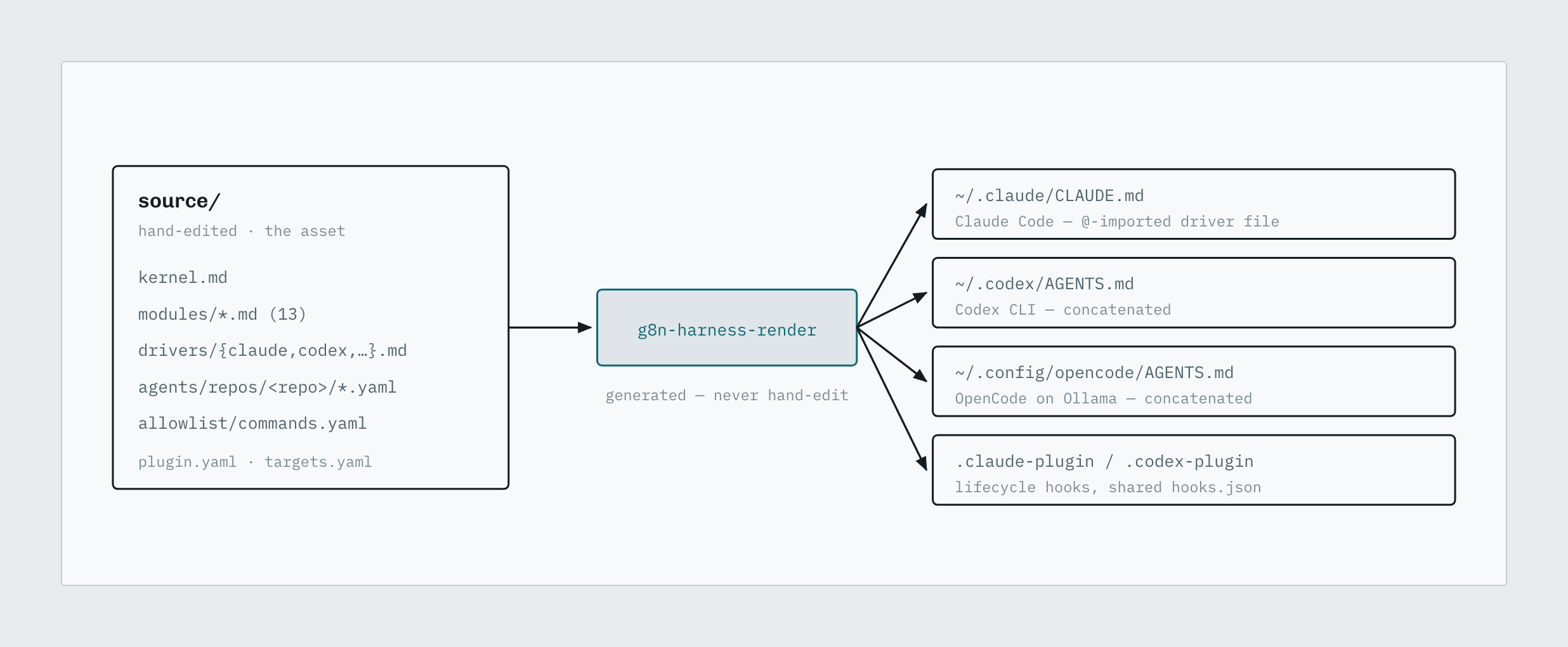
Every agent I’ve started since Thursday morning is set up this way, in Claude Code and in Codex. The ones I started before the change held the old full-access key, and Oracle revoked it at 10:19 p.m. CT on October 15, once it had sat idle for six hours.
One more rule covers what comes out of the memory. GBrain marks the pages nobody’s reviewed yet, but it still ranks them in search, so keeping them out is up to whatever’s asking. Core leaves unreviewed pages out of anything it hands an agent, and there’s a test that fails if any new code reads from the memory without that filter.
How do I keep it current?
Most of the upkeep’s on a clock. A worker on my server checks for new or changed material every 10 to 21 minutes and does the slow jobs, like turning new chunks into numbers and finding links. Once a day, a pass picks out dates and the links between pages that mention each other, and it runs the scan for text that tries to give my agents orders. The nightly pass runs between 3 and 6 a.m. CT, only when the model on my Mac answers, and it’s got 90 minutes.
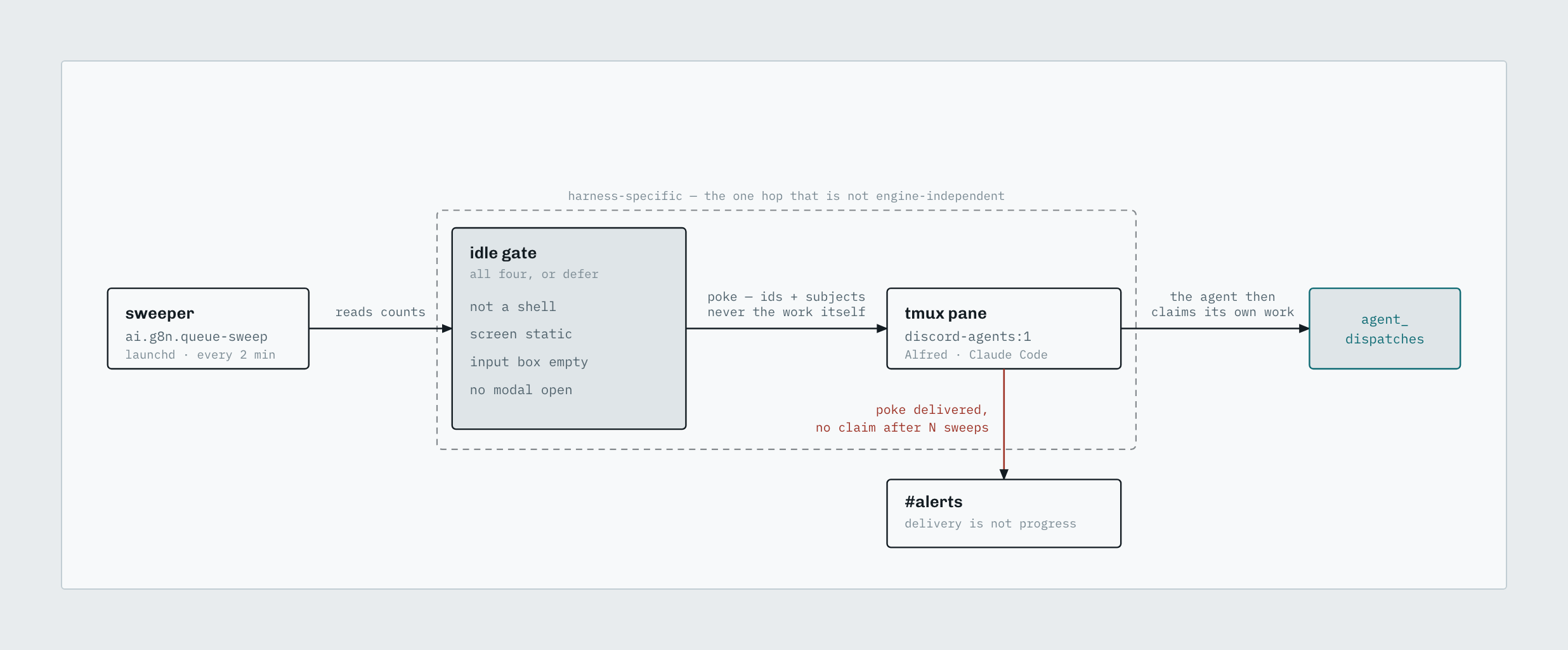
I moved from GBrain 0.50.0.0 to 0.60.266.0 this week. The contributors and developers have shipped more than 250 releases in the five weeks between the two, and I keep daily backups, seven at a time, as the way back. Every Monday morning, Lucius checks for new releases and reports them to Gordon and Oracle. The same morning, a job puts our changes on top of the newest release and builds it, then stops, and nothing changes until I’ve approved it.
Do you need this if you only run one AI agent?
Probably, if you’re coming back to the same projects and you’ve got notes or documents your agent should know. With one agent you’ll get memory that lasts between sessions and plain-language search over your own notes and code, and it’ll all run on your own computer with no server. If your AI work is one-off tasks you never come back to, it isn’t worth the setup.
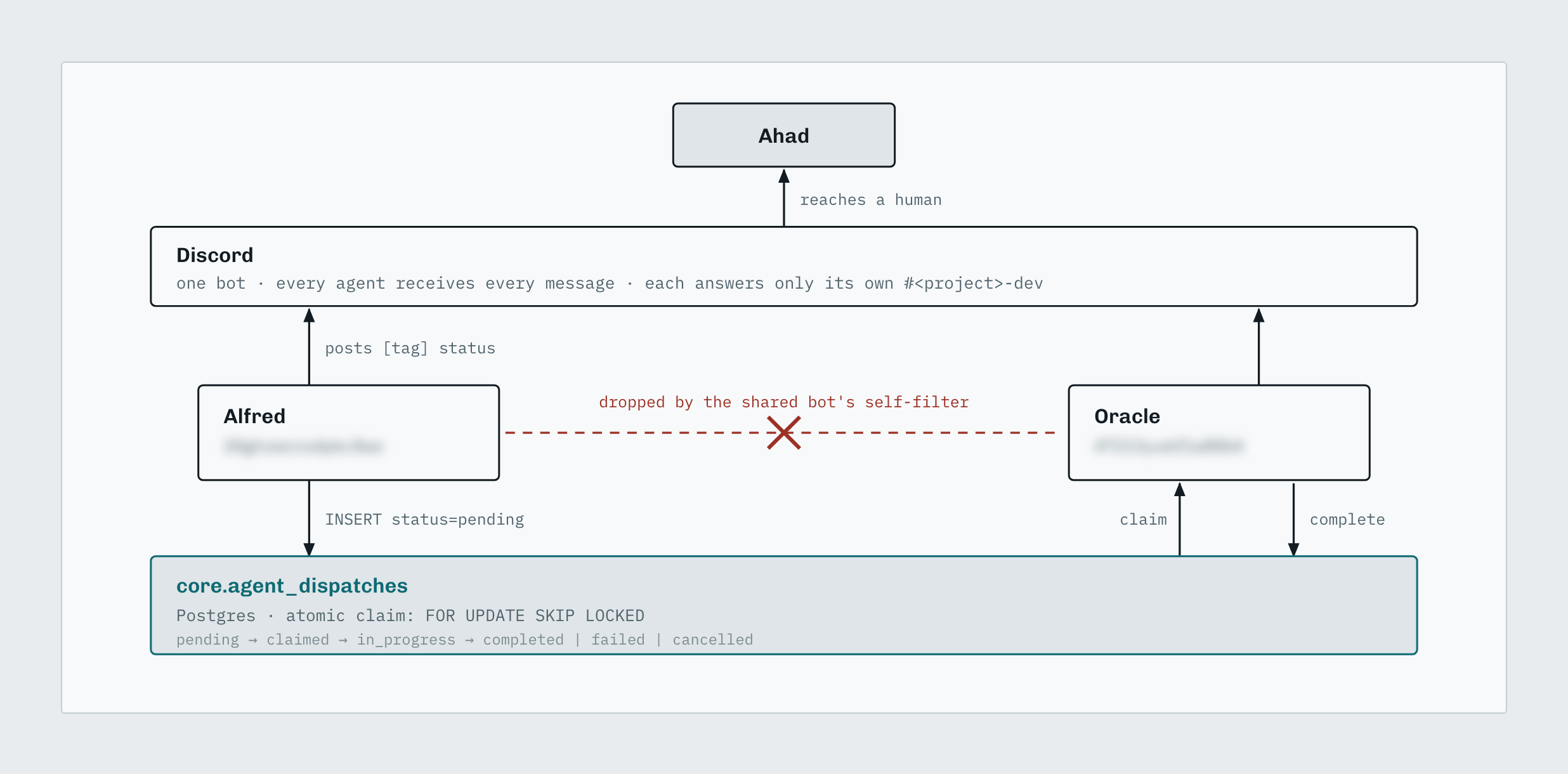
A team of agents is where it’ll pay off most. They share one memory, each one gets its own permissions for which sections it can read and write, a server does the slow work in the background, and your own apps can write into it, the way Core sends in its articles. Once agents start handing work to each other they’ll need the same facts, and without a shared memory you’re explaining the background again at every hand-off.
What can you set up in ten minutes?
First, pick the one place your notes, call summaries and decisions already live, and connect it to the AI tool you use most, read-only if the tool offers that. Then, ask it a question you’ve already answered in those notes, and check that the answer comes from them. If it does, that tool has stopped starting from zero.
Second, look at the key or connection that tool now holds, and write down the most destructive thing it can do. If delete is on the list and the job only reads, make a read-only key and swap it in. A refusal later tells you the limit is working.
From then on, there’s one habit to keep: when you finish a call or a piece of research, the notes go into that one place, and you’ll stop pasting the same background into every new chat.
Below this point, for free subscribers, there’s the technical setup I run: the install for one agent, the server layout for a fleet, the settings, and the problems we hit along the way.
I won’t be narrating that portion, but feel free to view the post and look at the content. Subscribe now, or: