


[Show notes]
AI Cred: https://www.aicred.ai
Built by https://substack.com/@limitededitionjonathan in collaboration with https://substack.com/@natesnewsletter.
[/Show notes]
Post content below describes the build process, AI tooling, and prompts leveraged so that anyone could follow along
I recorded an audio dump of my brand strategy and the raw contents of the original script for this episode.
The script was refined with a Claude Project around my publication’s podcasts, whose instructions I used Claude Opus 4.5 deep research mode to create.
I subsequently used contents from the research report to re-order the script and contents in the optimal way for a podcast to convey its content, and I then edited and refined it until it fit my style and voice.
I subsequently recorded the audio for the podcast following this transcript.
Then leveraged AI sound editing software provider Podcastle.io to boost the quality of the audio recording to studio level and help remove background noise.
I also used an AI effect to auto-level the volume and remove long silences and pauses.
I then used the audio mixing and timeline tools to and make some edits and clean up places where I screwed up or had to re-state a line, and lastly exported it as an mp3 file.
Finally, I generated these infographics with NotebookLM after Gemini 3 Pro’s launch.
Nana Banana Pro’s text fidelity in image generation is pretty unparalleled. Still not completely mistake free, but I also generated from an 18m audio clip, so it was a little information dense.
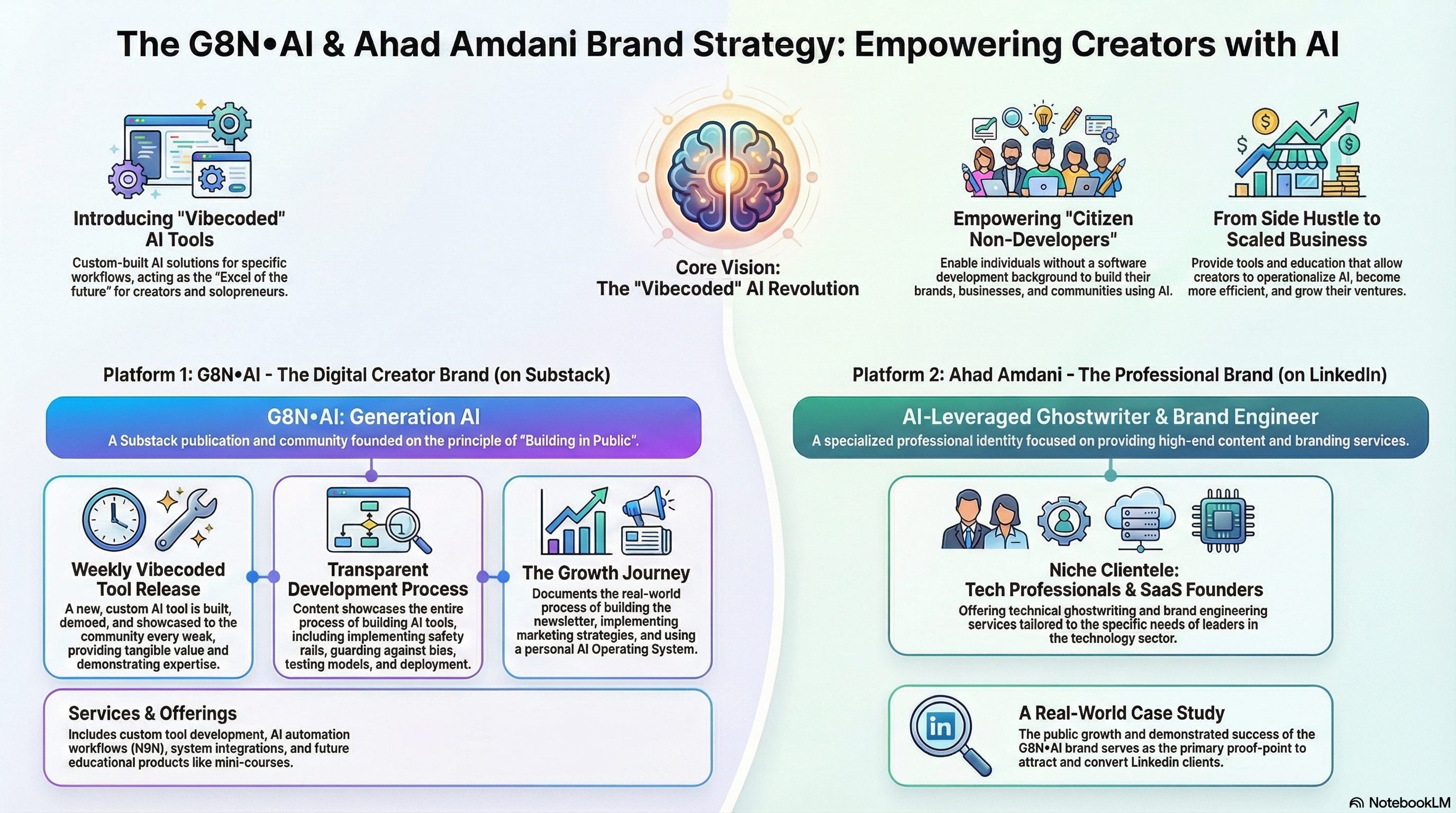
Here’s a great infographic of the brand strategy for me:

And a pretty easy to consume one that’s geared a bit more client/customer-facing:
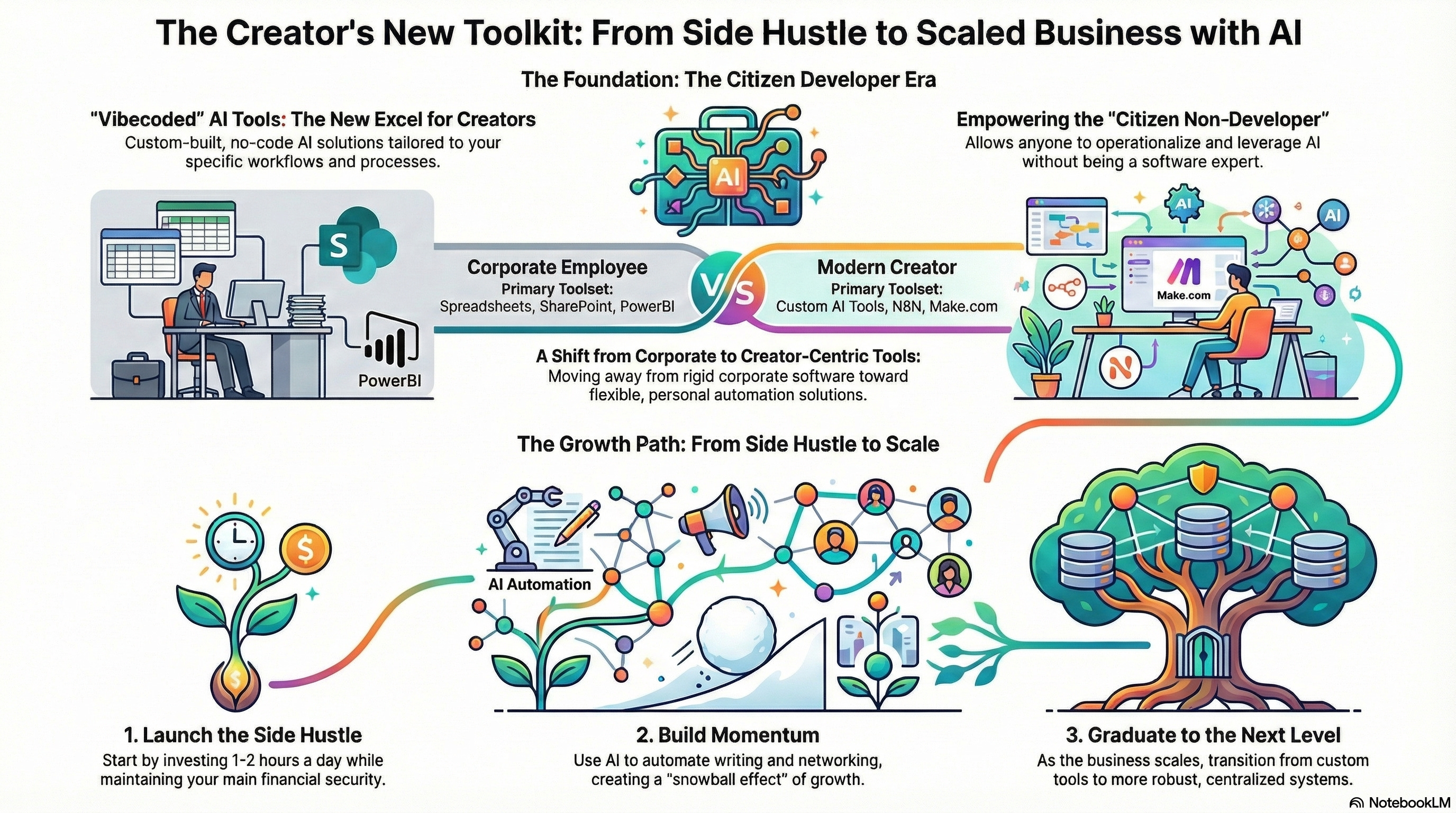
Plus the one you already saw above, showcasing the publication’s process for educating and up-skilling the new generation of digital content creators.
Transforming them into future citizen developers.
The publication’s Substack banner/header image was generated in Gemini with Nana Banana Pro, and it included the logo, so I took that portion and made proper podcast artwork and publication logo in Substack’s formats with it.
I’m sharing the prompts for each of the pieces of artwork that were generated below, and I already described the simple process for generating the infographics via NotebookLM above.
Using a single-source notebook works best in my opinion, unless you’re really compiling a lot of information from a lot of sources together.
The other thing to take note of is that while I specified a bit of detail in the initial prompts, I kept things pretty simple, and stuck with only regenerating a few times, making a decision quickly in order to get published.
It doesn’t matter if it’s rough. It doesn’t matter if you want to change it down the line - it’s easy to do, and what really matters is the content.
I personally feel my delivery’s a bit wooden some times, and sometimes a bit robotic or stilted. That’s fine - if this gets enough traction, I’ll re-record it and update the post with the higher quality recording.
In software development, there’s an old saying: Make it work, make it right, make it fast. This refers to getting it published/functional, then appropriately refactored/pretty, then optimize it and make it scale.
This iterative approach emphasizes incremental progress and quality improvement over time, ensuring functionality and correctness are prioritized before performance.
In the content creator world, there’s an alternative approach, or at least the path I’m pursuing: write intentionally, test quickly, polish relentlessly.
Banner prompt:
Wide horizontal banner aesthetic. A detailed, multi-layered digital blueprint background with faint isometric grid lines. Hovering above the blueprint is a glowing, holographic 3D model of a complex, impossible architectural structure (like an Escher design). The light sources are soft gold and sapphire blue, suggesting deep focus and intellectual exploration.
Overlaying the blueprint texture, position the text:
Title in a distinguished, clean font: Shape the Present
Subtext: Leverage bespoke AI tooling to customize your business workflows and design your operation
Below the text, a button designed to look like a glowing schematic outline, containing the text: Discover G8N•AI
Detailed, schematic overlay, digital drawing style, deep depth of field. Aspect ratio 21:9
Create an on-brand logo for my Substack at https://g8n.ai/ whose short description is GenerationAI • Focus with Intention and Leverage with AI
Logo prompt:
Wow, I love that logo that’s on the top right of the one you just made. Let’s get a square image version of that 256x256 px
Podcast Artwork Prompt:
I need a 1400x1400px version of the above logo/image as well for my substack’s podcast artwork
[End of Post Content]
[Transcription]
Hello, I’m Ahad Amdani, and welcome to Generation AI. That’s G8N dot ai, where I explore practical ways to build with artificial intelligence. I’m building in public, vibe coding custom AI tools, and sharing everything I learn along the way.
This is actually my first real episode, and I want to talk about something I’ve been thinking about a lot lately. Why custom vibe-coded tools are going to become as essential to solo builders as spreadsheets were to corporate workers.
Let me explain what I mean by that. Think about how spreadsheets work in corporate environments. People use Excel for everything. Budgets, tracking, analysis, reporting, you name it.
And sure, eventually companies move to dedicated software. They get web apps, portals, maybe something like PowerBI for visualization. But here’s the thing, people still use their spreadsheets alongside those tools because spreadsheets are flexible. They are personal. They fit the way you actually work.
Now, we’re entering a new era. More people are building personal brands. More people are starting custom businesses, growing communities, creating content. And for those people, the solopreneurs, the independent creators, the folks just getting started? The custom vibe-coded AI tool is becoming the new spreadsheet.
Let me be specific about what I mean by vibe-coded. It’s using AI to build tools quickly, iteratively - based on feel rather than formal engineering processes.
You describe what you need, the AI helps you build it, and you refine as you go. It’s not about being a professional developer. It’s about becoming a citizen developer. And that’s a shift worth paying attention to.
I’ve got about 18 to 20 years of experience in software development. But when I build these vibe-coded tools, I’m not writing traditional code most of the time. I’m prompting, I’m iterating, I’m using Claude, ChatGPT, Gemini - whatever model fits the problem. Right now, I’m on the Claude Max plan.
That is $100 a month and it gives me access to Claude Code which I use constantly for development work. I also have subscriptions to Google’s AI Pro and ChatGPT. My company covers a couple of those which helps.
And honestly, I use these tools for my day job, too. So, it’s not wasted spend.
Here’s the thing, though. Even when someone outgrows vibe-coded tools when they scale up and need enterprise software: they’re not going to cancel their AI subscriptions.
They still use AI for prompting, for custom artifacts, for their personal workflows. The subscriptions stick around because the value compounds.
So, if you’re starting out with $20 a month on ChatGPT or $100 on Claude, think of it as infrastructure. It’s the foundation you’ll build on for years.
If you’re building a personal a brand, growing an audience, starting a side project while still working your day job, you don’t have the budget for expensive SaaS tools.
You can’t pay $50 per user per month for every piece of software that you need. It doesn’t scale when you’re a team of one.
But here’s what you can do. You can build a custom vibe-coded solution, something specific to your workflow - your needs - for a one-time cost. Maybe it’s $3,000. Maybe it’s $5,000. But now you own it. It connects to your systems. It automates the tedious parts of your process. It lets you focus on the work that actually matters.
That is powerful. It means you can operationalize from day one without the recurring cost burden that kills so many early stage projects. And here’s the trajectory. You start with these custom tools. You grow. Eventually, you hire people and those people bring their own tooling and workflows. You graduate to more centralized systems just like companies graduated from spreadsheets to web apps. It’s a natural progression, but you have to start somewhere accessible.
Now, I want to be honest. To become a citizen developer, you need some education. You need to understand how AI tooling works. Not just surface level prompting, but how to build safety rails, how to guard against biases, how to test your outputs.
There’s a tool I’ve been looking at called AICred. It’s an assessment that takes about an hour and it helps you understand where you are with AI literacy. What you know, what you don’t, and what you should study next. It even generates personalized learning plans. I’ll link to it in the show notes.
The point is, even if you decide you don’t want to build these tools yourself, understanding what’s possible empowers you. You can hire someone to build exactly what you need. You can evaluate what they deliver. You can make informed decisions instead of just hoping for the best.
So, here’s what I’m committing to with this podcast and this publication. I’m building everything in public.
The newsletter, the vibe-coded tools, the marketing strategies, the mistakes, all of it.
Every week I’m going to build and release a new tool. I’ll show you how I construct safety rails, how I test across different models, how I deploy - the whole process, visible.
I’ve also rebranded the publication. It was called Focus and Flow. Now it’s Generation AI, g8n.ai.
That’s G, the number eight, N, dot AI. Eight letters between G and N.
Similar to the naming style of N8N, if you’re familiar with that automation platform, it’s supposed to be pronounced node-mation (node + automation). G8N stands for generation.
And I’m doing this while working my day job, learning from mentors in a couple of cohorts, and trying to grow my presence on both Substack and LinkedIn. It’s a lot, but I think that’s the point. Showing what’s actually possible. when you have the right tools and the right systems.
Here’s what I’m asking from you. If there’s a specific kind of vibe-coded tool you’d find useful, something small, practical, something that could help a lot of people?
Drop a comment, reply to the newsletter, let me know. If it’s the right fit, I might build it and demo it in a future episode.
And if any of this resonated, if you’re building your own brand, starting your own side hustle, figuring out how to work smarter with AI? Subscribe. The newsletter goes out weekly. The podcast is just getting started.
That’s where we’ll leave it for today. Thank you for spending this time with me.
I know there are infinite things competing for your attention and the fact that you chose to listen here? I don’t take that for granted.
Head over to g8n.ai for show notes and resources. That’s G8N dot AI.
Until next time: keep building, keep learning, keep asking good questions. Talk soon.


